Hotkey Trader Get early access
Chrome extension for the Tradovate web trader

One tap.
The whole trade, handled.

Hotkey Trader adds a pad of programmed buttons next to trader.tradovate.com. Each one does in a single tap what Tradovate's basic buttons leave to you: enter with a full NinjaTrader-style ATM, place a Breakout OCO on both sides, take a partial and trim the brackets to match, and copy all of it, ATMs included, to your other accounts.

Demo and live accounts Live trading stays off until you allow it Release date: coming soon
Buy
market
Partial
close 50%
Breakout
OCO
DONEOne tap each: an entry with its ATM, a partial with matching brackets, a two-sided breakout.
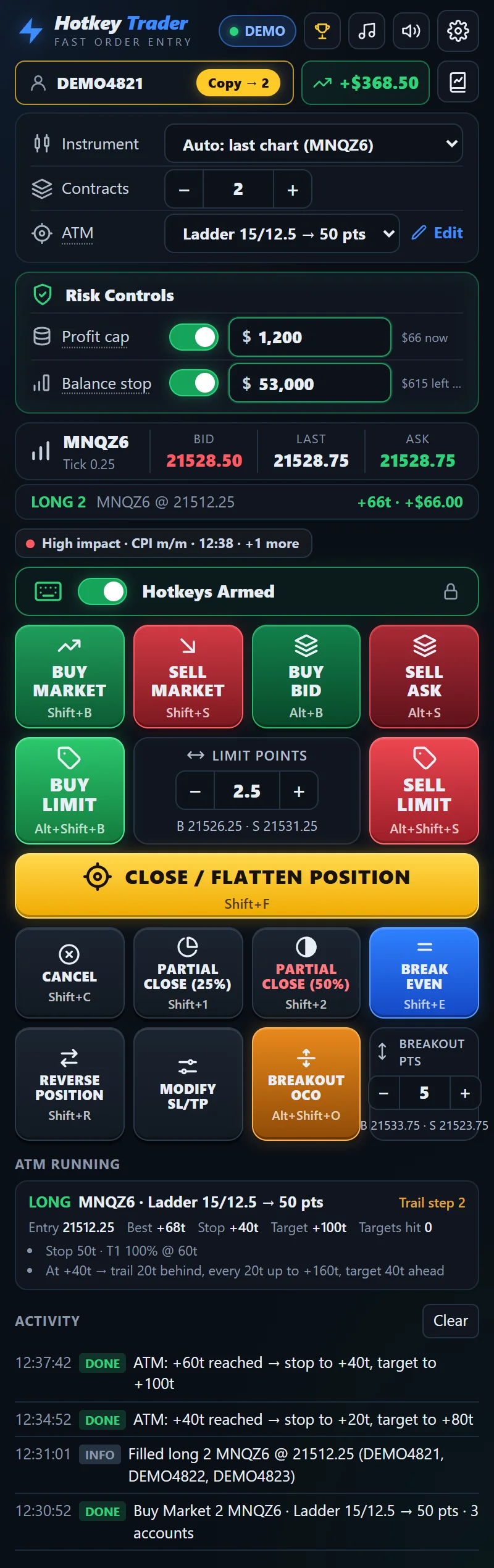
The Hotkey Trader button pad: Buy and Sell Market, Buy Bid, Sell Ask, Buy and Sell Limit with a points dial, Close / Flatten, Cancel, two Partial close buttons, Break Even, Reverse, Modify SL/TP and the orange Breakout OCO, above a running ATM card Demo account · demo data
The button pad in Chrome's side panel, captured from the extension itself.
The programmed button pad

Same buttons you know.
Programmed to do more.

Tradovate's chart and DOM have the basics: Buy Mkt, Sell Mkt, Buy Bid, Sell Ask, Close, Reverse, Cancel All. Each does one basic job and leaves the follow-up to you. The pad sits in Chrome's side panel next to your Tradovate tab, and every button is programmed to do that follow-up for you.

The full side panel: account, ATM picker, risk controls, quotes, the button pad, a running ATM and the activity logDemo data
  1. Buy / Sell
    market
    Enters with your whole exit plan attached.

    The ATM you picked goes out with the order: several targets and a runner, a stop, then break-even, lock and a ratcheting trail that move those orders for you as price runs.

  2. Buy bid /
    Sell ask
    Joins the bid or ask, ATM included.

    Plus an offset in ticks if you want one. The brackets go on the moment it fills.

  3. Buy / Sell
    limit
    A limit a set distance from the last price.

    Dial the points on the pad once. No hunting for a price level on the DOM.

  4. Breakout
    OCO
    Both sides of the range in one tap.

    A buy stop above and a sell stop below as one OCO. The side that fills gets your ATM, Tradovate cancels the other, and if a stop can't be placed the position is closed.

  5. Partial
    close
    Takes some off and keeps the rest covered.

    Two buttons (25% and 50% by default). The stop and target legs shrink first, furthest targets first, so the brackets always match what you still hold.

  6. Break
    even
    Stops to entry, plus your ticks.

    Every stop on the position moves at once. It refuses if price isn't far enough in profit yet, so it can't stop you out by accident.

  7. Modify
    SL / TP
    Nudge all stops or all targets.

    A set number of ticks per tap. A stop never moves through the market and a target never lands behind it.

  8. Reverse
    position
    Flips you, then re-arms the exit.

    Flattens, waits until you're flat, then enters the other way with your ATM attached.

  9. Close /
    flatten
    Out, and nothing left behind.

    Closes the position and cancels the bracket legs it leaves. Cancel, next to it, pulls only your entry orders and leaves the brackets protecting an open trade.

Every button, every account. Switch Copy on and each tap also goes to every ticked account at the same time, each with its own order and its own ATM.

See it before you tap. Hover an entry button and the panel draws where the entry, targets and stop would sit against the market.

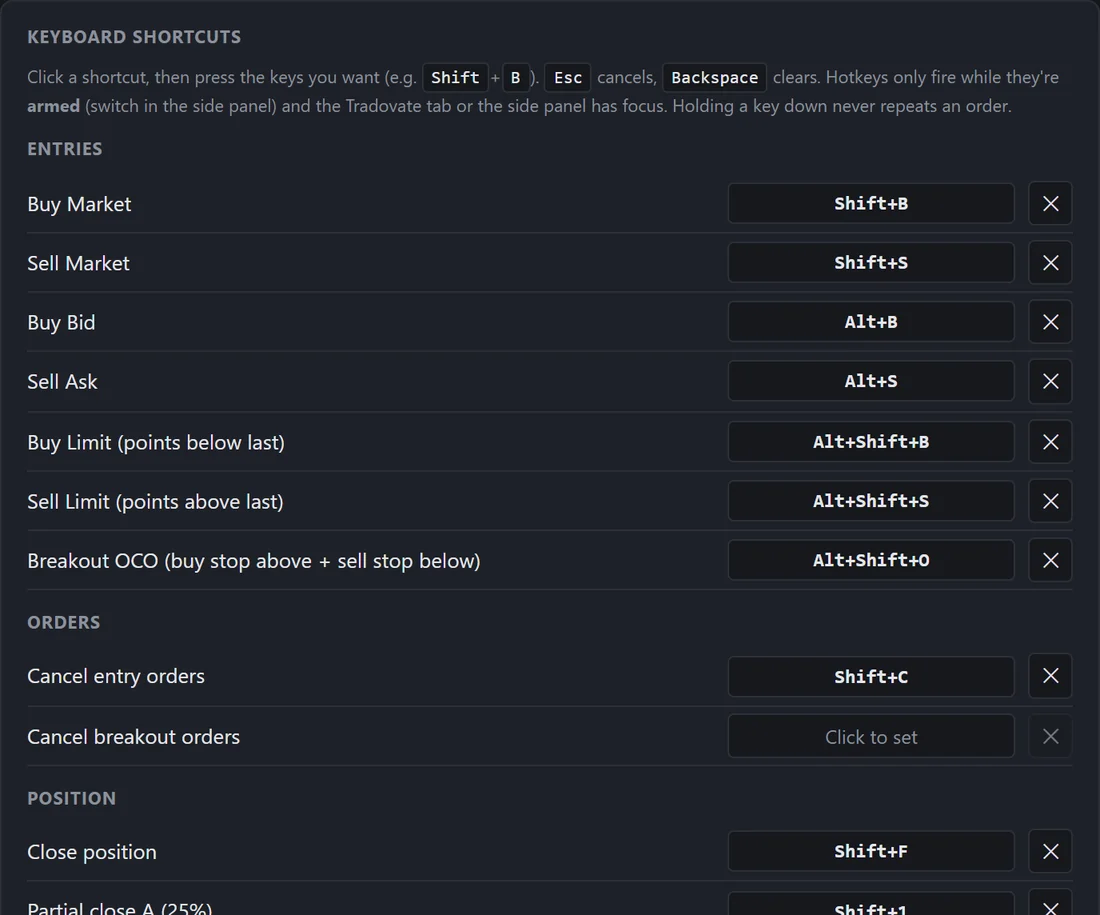
Keyboard too. Every button also has a keyboard shortcut you can remap, for when your hand is already on the keys.


The ATM ladder

Your stop climbs.
Your target runs ahead of it.

This is the built-in Ladder 15/12.5 → 50 pts preset on NQ / MNQ, step by step. You choose the ATM once; every entry button on the pad carries it, and the extension moves the orders while you watch the tape.

Ladder 15/12.5 → 50 pts · longillustration
Price0 pts
Stop−12.5 pts
Target+15 pts
Initial bracket: stop −12.5, target +15.
Demo data
The same preset in the panel. Hover a running ATM to see its live stop and target against the last price.
  1. Entry: one Tradovate bracket goes out with the order: stop 12.5 pts, target 15 pts. They sit on Tradovate's servers.
  2. At +10 pts the stop jumps to +5 and the target to +20.
  3. Every further +5 pts both move up 5. The stop never moves backwards.
  4. At +40 pts it stops stepping: the trade ends at the +50 target or the +35 stop.

Honest comparison

Why not just Tradovate's built-in tools?

Tradovate's web trader is good, and it already has buttons, brackets and hotkeys. Here's what it has, and what the programmed pad adds on top.

FeatureTradovate web traderWith Hotkey Trader
Order buttons Built inBuy Mkt, Sell Mkt, Buy Bid, Sell Ask, Close, Reverse and Cancel All on the chart and DOM. Each sends one order. AddsProgrammed buttons: entries carry your full ATM, partial closes trim the brackets to match, plus Break Even, SL/TP nudges, limits a set distance away and Breakout OCO. Every button can go to all your copy accounts at once.
ATM brackets Built inMulti-brackets up to 10 levels, auto break-even and auto trail. AddsNinjaTrader-style stacked steps: break-even after a target fills, lock, several trail steps with their own frequency, "up to" limits, targets that move with the stop, and a stop simulator.
Breakout OCO PartlyOCO and OSO orders you set up by hand. AddsOne tap: buy stop above and sell stop below as one OCO. Your ATM is attached the moment one side fills.
Copy trading PartlyGroup Trade sends one order to several accounts. Prop-firm help pages say ATM brackets don't ride along. AddsEvery account gets its own order and its own ATM bracket, break-even and trail. Close and Cancel copy too.
Profit cap and balance stop Not built inAccount risk limits come from your broker or prop firm. AddsClose a trade at a $ amount, or close everything and block entries once the account reaches a balance you choose.
Trade journal PartlyAccount reports and fill history. AddsJournal with MFE / MAE, results per ATM, time of day, market regime, a P&L calendar, notes, tags and CSV.
Achievements, leaderboards, groups Not built in Adds300 achievements with XP, opt-in leaderboards, private groups with competitions for trading communities.
Discord P&L posts Not built in AddsEach closed trade posted to your own Discord channel: "MNQZ6 · Long · +$117.52".
News countdown Not built in AddsA countdown chip before high-impact US releases (CPI, FOMC, jobs). It warns and never blocks.
Keyboard shortcuts Built inConfigurable hotkeys, switched on per module (DOM, chart, order ticket). AddsEvery pad button also has a shortcut (25 actions) that works on the whole Tradovate page. Arm / disarm switch, a held key never repeats.
Connection drops Built inThe app reconnects on its own. AddsNew entries pause while it's down (Close and Cancel still go), then running ATMs catch up. A watchdog spots Tradovate changes within minutes.
Settings everywhere Built inYour Tradovate workspace follows your login. AddsYour ATMs, shortcuts and panel settings follow your Hotkey Trader account. Bug reports go straight to the developers from Settings → Help.

Based on Tradovate's public help pages and release notes as of November 2026. Tradovate updates often, so check their docs for the latest.


Inside the extension

One idea at a time.

ATM builder

Build the exit once. Test it before it trades.

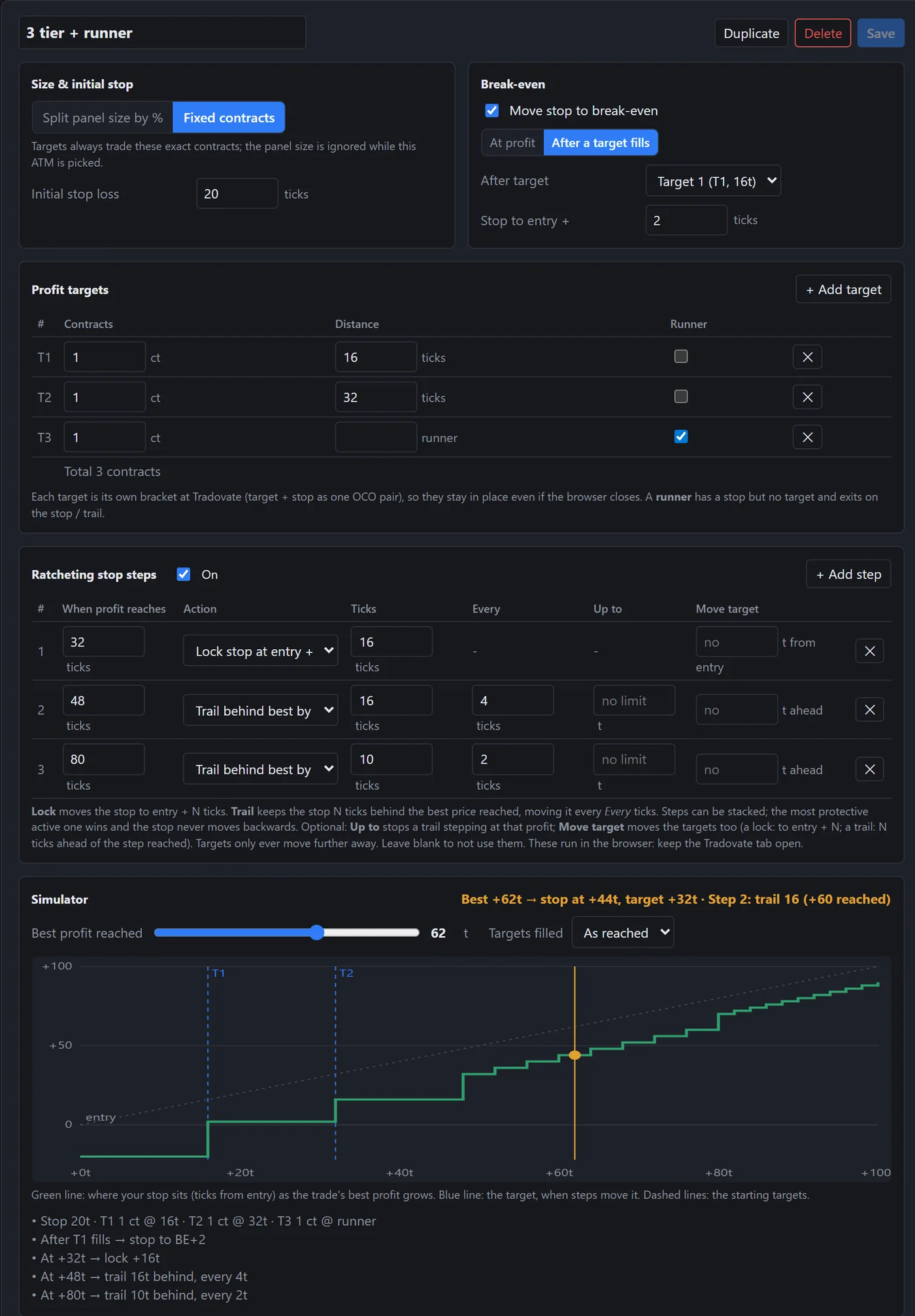
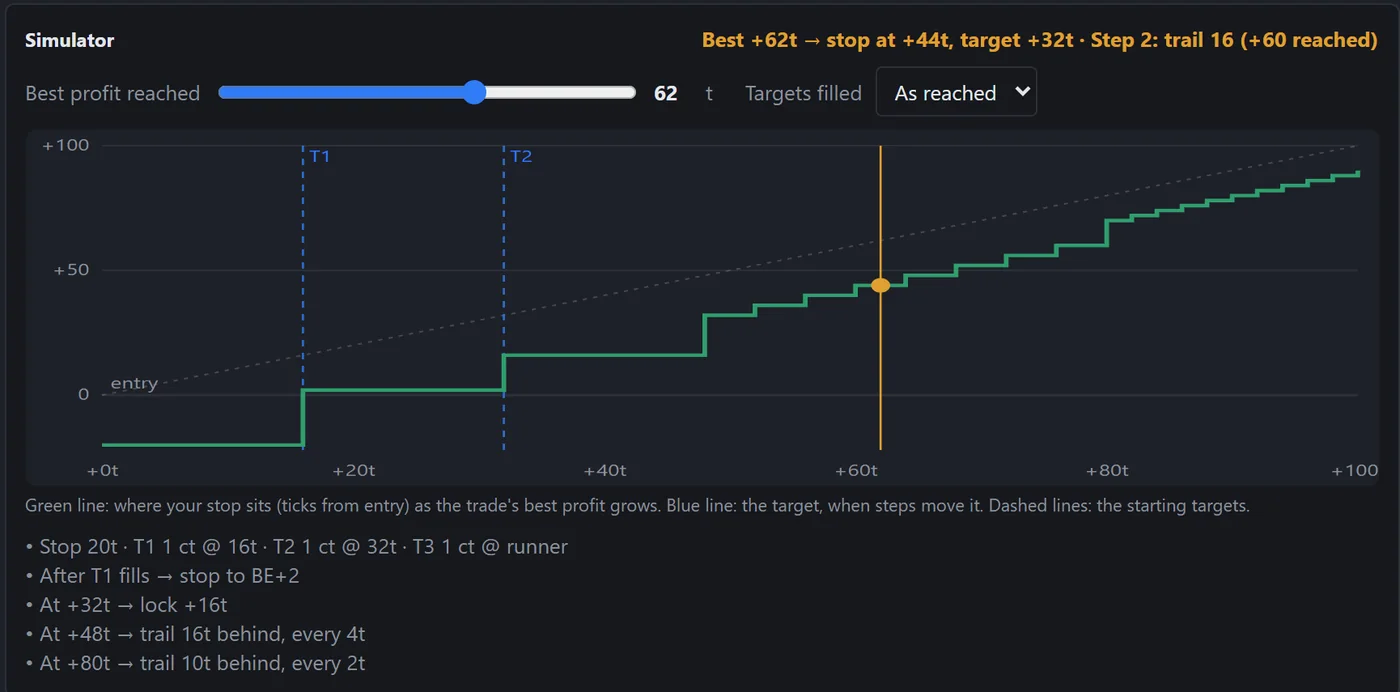
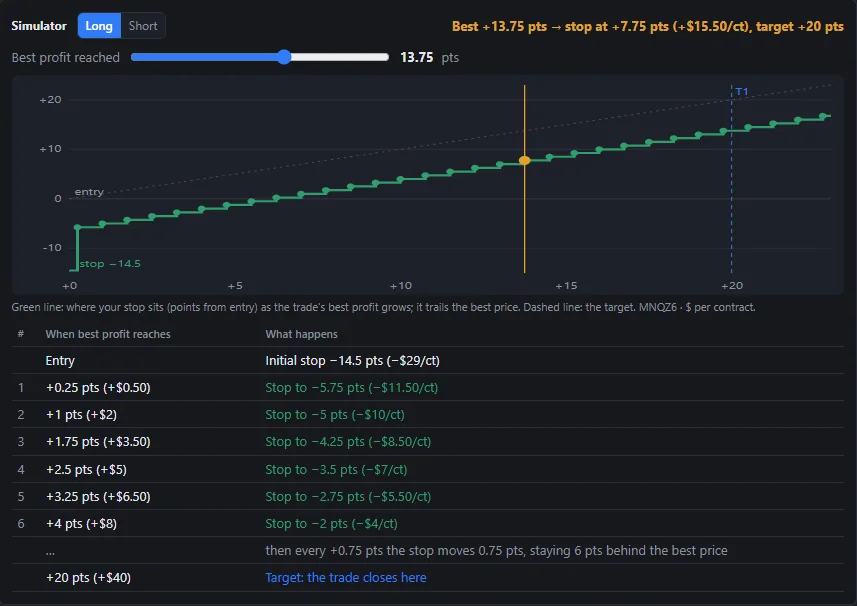
Split by contracts or percent, add targets and a runner, then stack the stop rules. The simulator draws where the stop sits as profit grows, so you see the plan before a single order goes out.

  • Break-even at a profit, or after a target fills
  • Lock steps and trail steps, each with its own trigger
  • "Move target" keeps targets ahead of a trailing stop
  • Presets included, from a one-target scalp to the 50-pt ladder
ATM builder in Settings: the '3 tier + runner' strategy with three targets, break-even after target 1, a lock step and two trail stepsSettings · ATM Strategies
Stop simulator: a green staircase showing the stop rising as best profit grows
Breakout OCO

Both sides of the range, one tap.

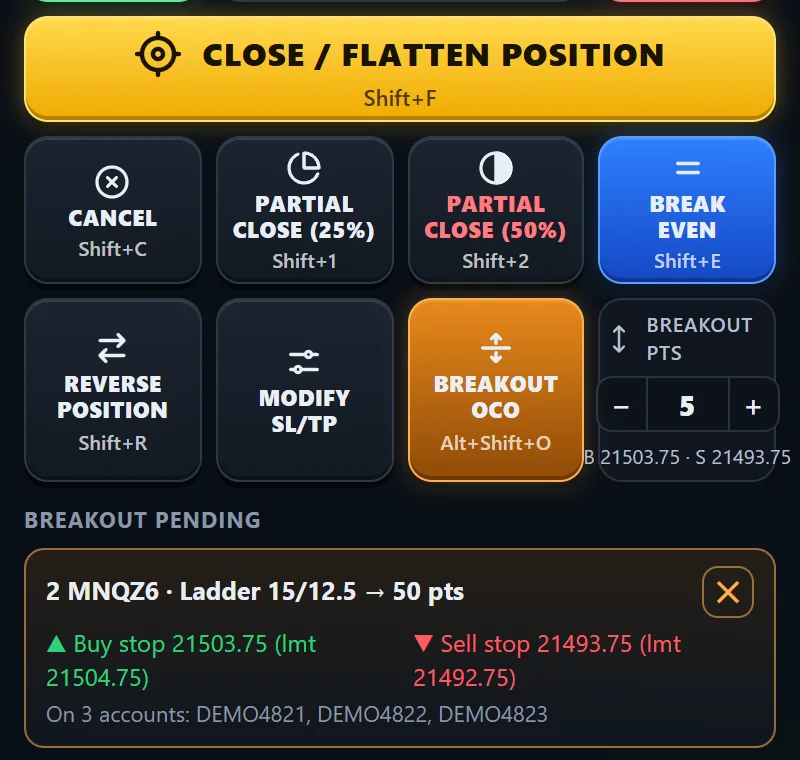
The orange button places a buy stop above and a sell stop below the last price as one OCO. When one fills, Tradovate cancels the other, and your ATM's brackets go on the filled side.

  • Distance set with the Breakout pts dial (5 pts default)
  • Stop-limit cushion (4 ticks by default) caps how far past the trigger you fill
  • If a stop can't be placed, the position is closed
  • Pending card with both levels and a ✕ to cancel
The orange Breakout OCO button and a 'Breakout pending' card showing a buy stop and a sell stop on three accountsDemo data
Copy trading

Copy the ATM, not just the entry.

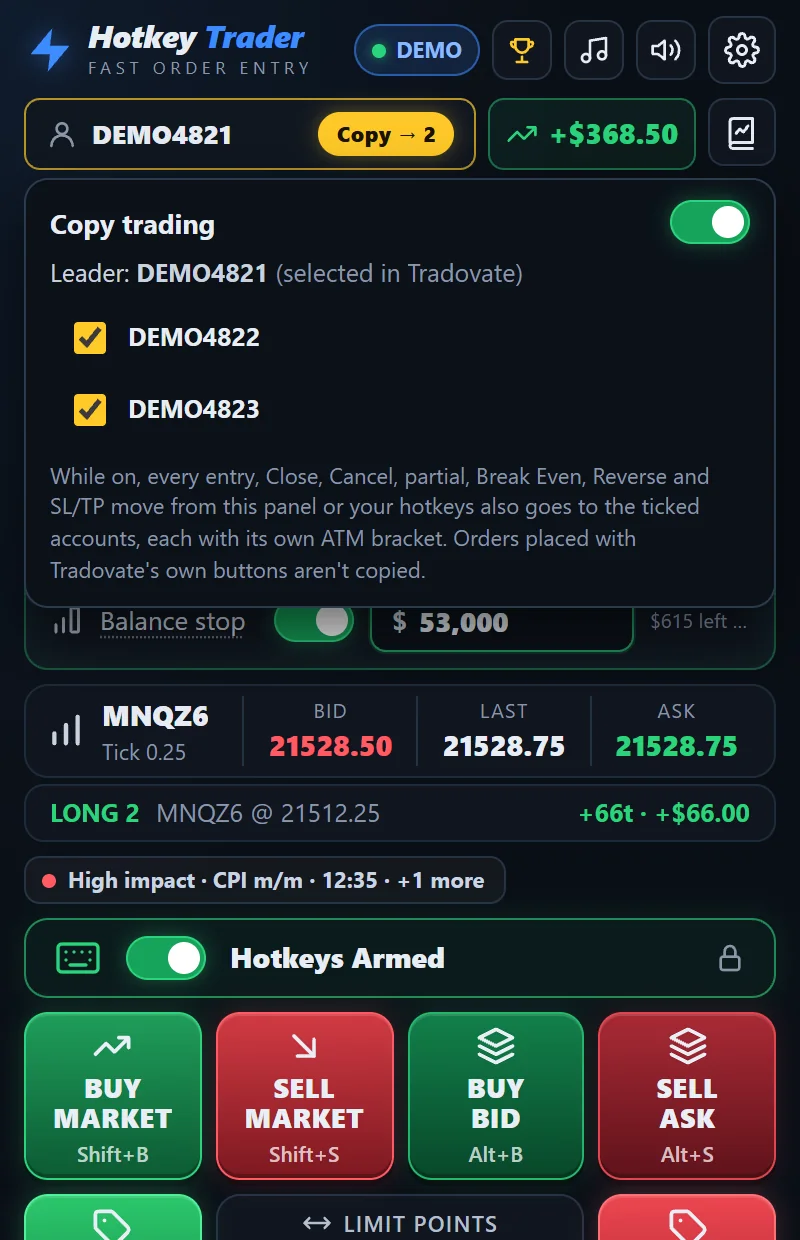
Tick the accounts on your Tradovate login and switch Copy on. Each one gets its own order and its own ATM bracket, break-even and trailing, from any button on the pad.

  • Close, Cancel, partials, Reverse and SL/TP moves copy too
  • The balance stop watches every copy account on its own
  • Pro copies to 1 follower account, Pro+ to up to 10
  • Many prop firms restrict copy trading. Check their rules first.
Copy trading pop-up: leader DEMO4821 with DEMO4822 and DEMO4823 tickedDemo accounts
Trade journal

Find out which ATM actually pays you.

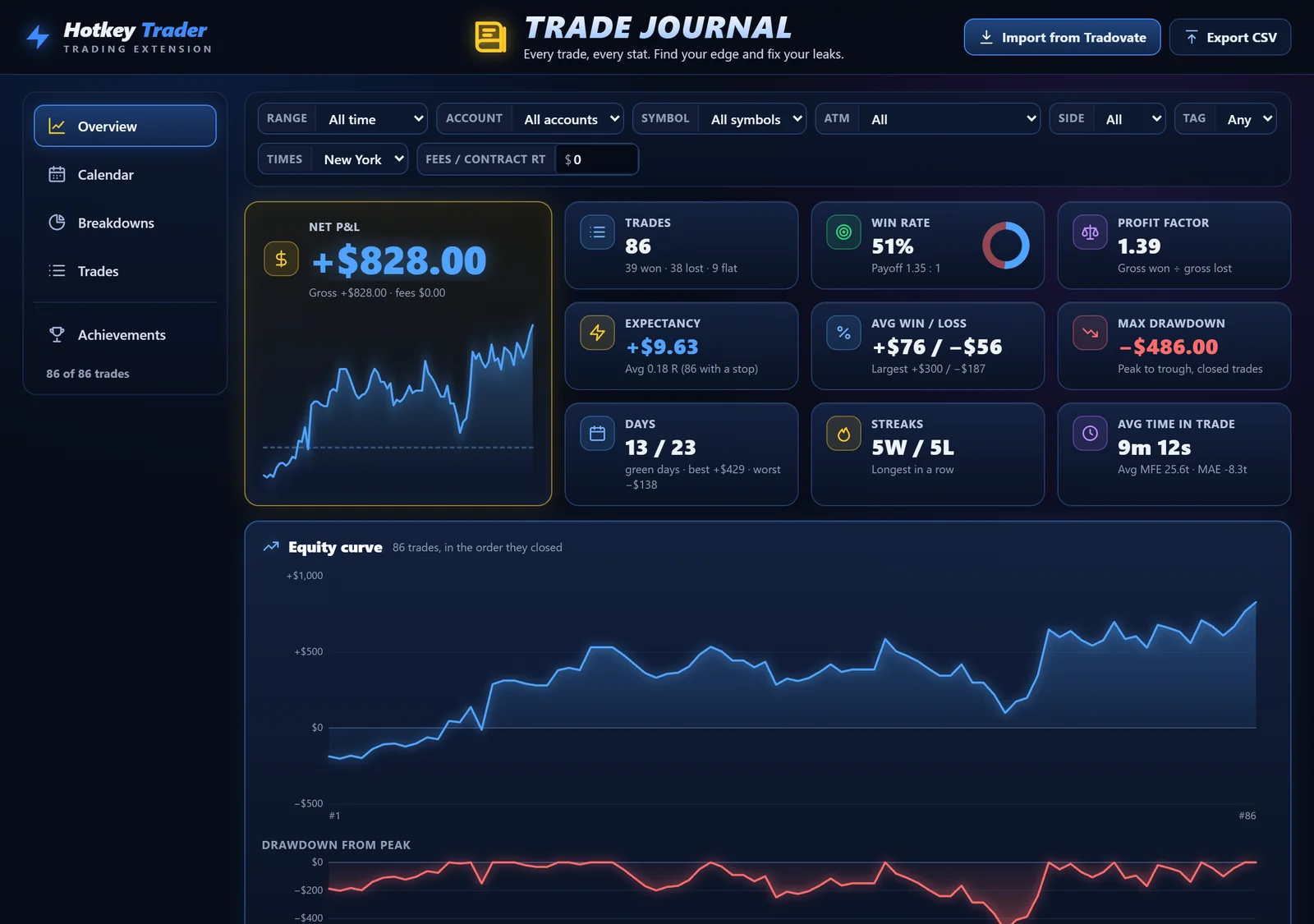
Every round trip is recorded from its fills, with the ATM, how you entered and how it ended. Then it's sliced the ways traders ask about.

  • Results per ATM, hour, session, weekday and market regime
  • Best open profit vs result (are you leaving money?)
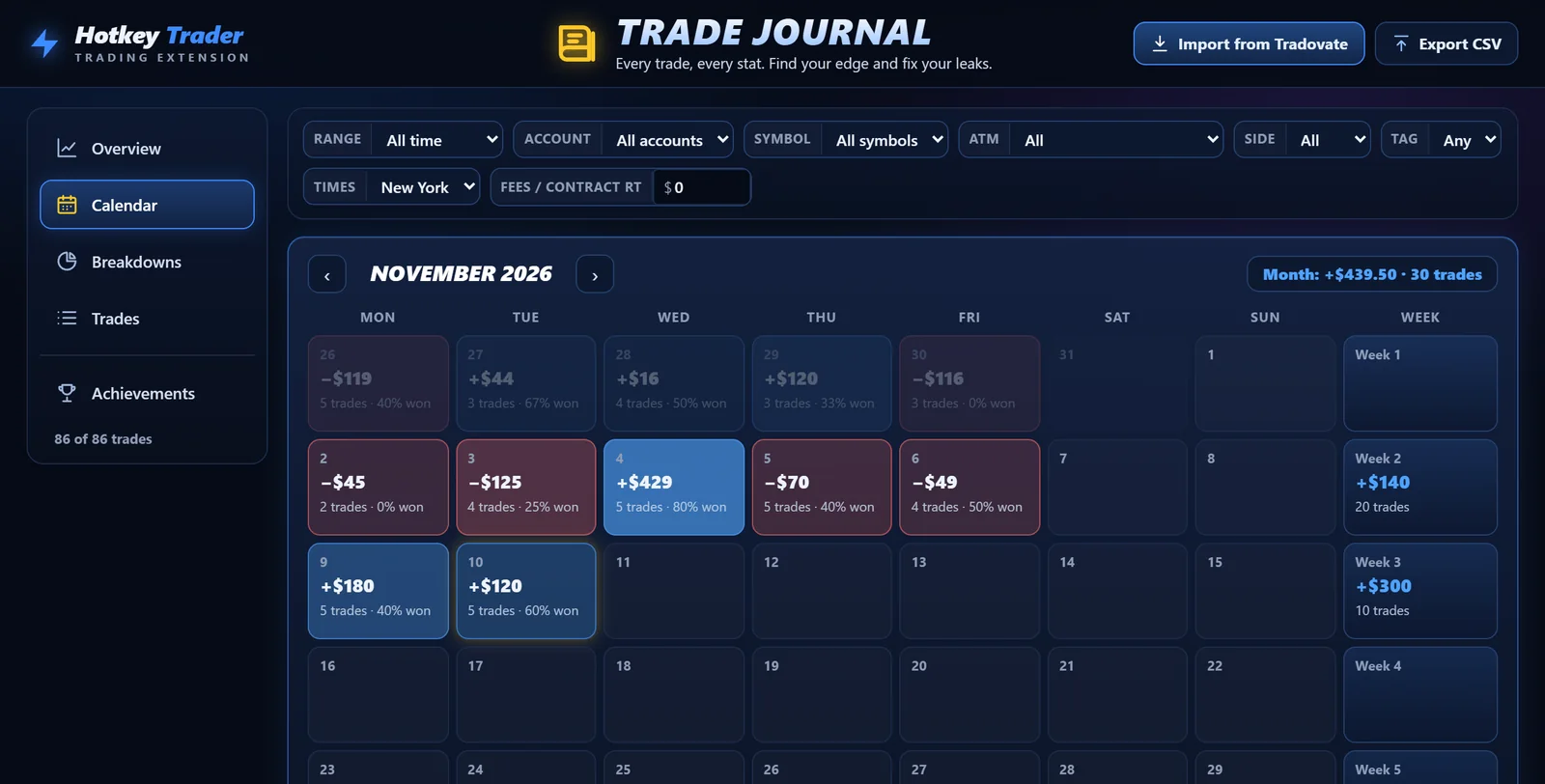
  • P&L calendar, notes, tags, ratings, CSV export
  • Import older trades from Tradovate
Trade journal overview: net P&L, win rate, profit factor, equity curve and drawdownDemo data
Journal calendar with daily P&L
Achievements

Reward the habits, not just the P&L.

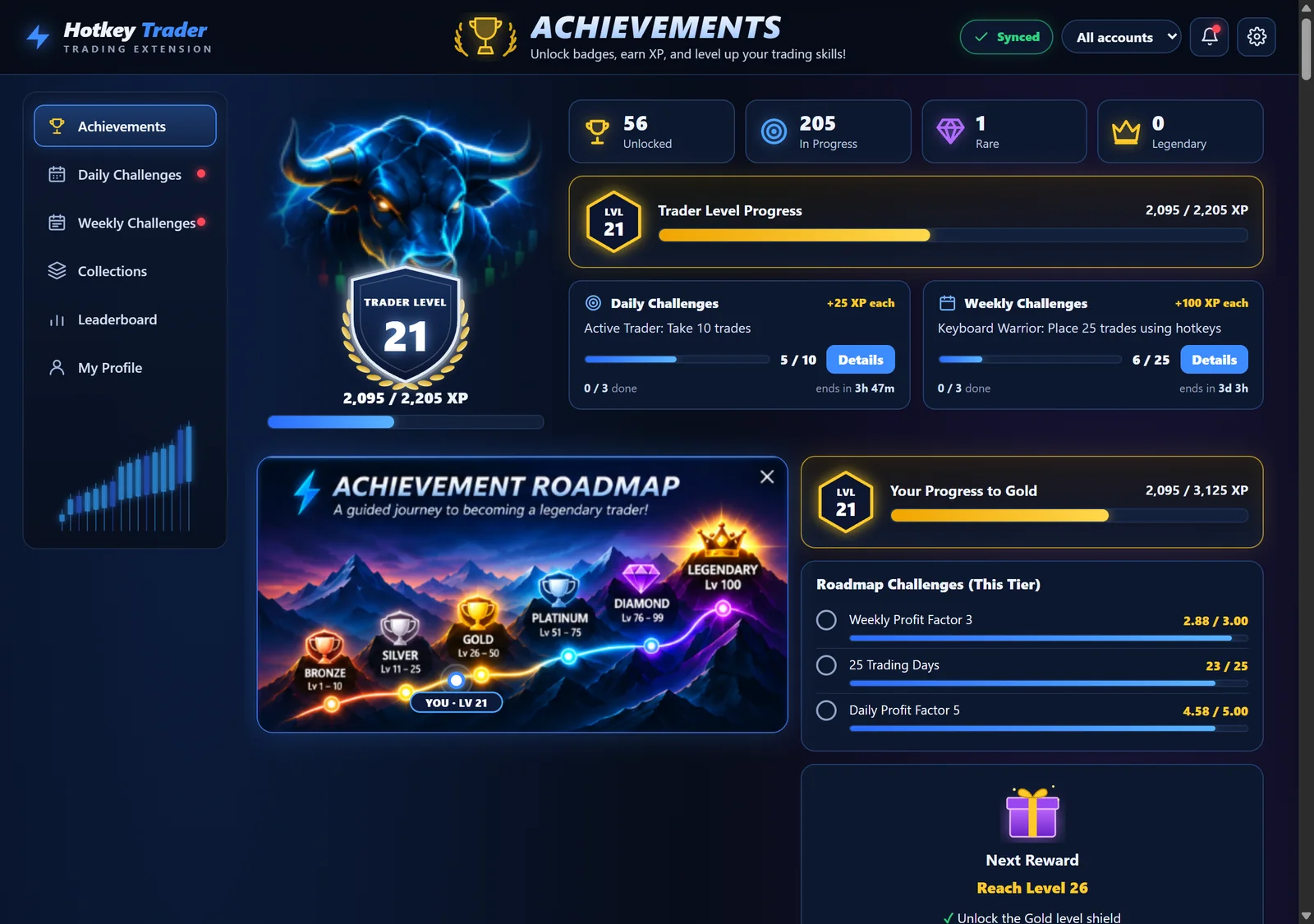
Achievements for green days, loss control, consistency, comebacks and clean execution, all computed from your journal. XP sets your Trader Level and unlocks page themes.

300achievements
7tiers, Bronze to Mythic
32daily and weekly challenges in rotation
Achievements page: trader level 21, XP progress, daily and weekly challenges and the achievement roadmapDemo data
Keyboard shortcuts

Prefer the keyboard? It's there too.

Every button on the pad also has a shortcut, and you choose which. They work anywhere on the Tradovate page, only while armed, and do exactly what the button does.

  • 25 mappable actions, 19 with defaults
  • Holding a key down never fires twice
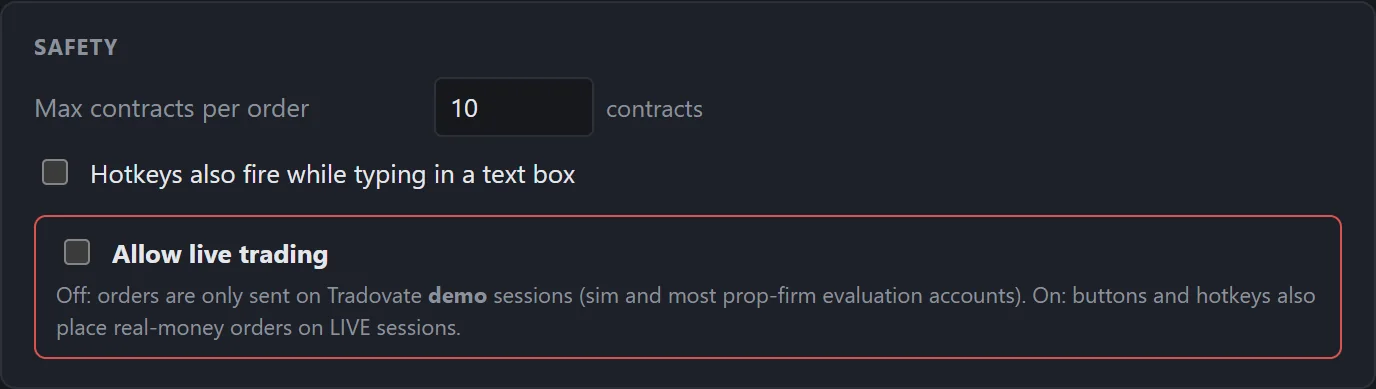
  • Per-order contract cap (10 by default)
  • Browser shortcuts like Ctrl+W are protected
Hotkeys settings: a list of actions such as Buy Market Shift+B, Sell Market Shift+S, Close position Shift+FSettings · Hotkeys

Built for prop traders

Rules you set before the trade, enforced during it.

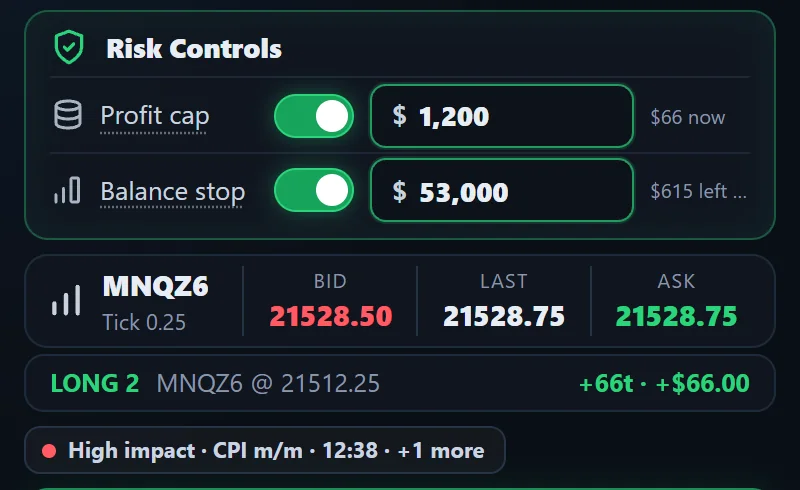
Evaluation and funded accounts live or die by a few numbers. Hotkey Trader keeps them in front of you and acts on them, without blocking anything you didn't ask it to.

Profit cap

Closes a trade at market once its P&L, including profit already taken, reaches your amount. Handy for consistency rules.

Balance stop

Pick a balance, say $53,000. When cash plus open P&L gets there, every position on that account closes and new entries are refused.

News warnings

A countdown chip before CPI, FOMC and jobs data, plus an optional heads-up on the Tradovate page. It never blocks an order.

Live is opt-in

Orders on a LIVE session are blocked until you switch on "Allow live trading". Test everything on demo first.

Safer reconnects

If Tradovate's connection drops, new entries pause; Close, Flatten and Cancel still work. Running ATMs catch up when it's back.

Panel risk controls: profit cap $1,200 on, balance stop $53,000 on, quotes, an open long position and a high-impact CPI countdownDemo data

Risk controls, the open position and the news chip sit right above the buttons.

Safety settings: max contracts per order and the Allow live trading switch, off
For streamers and trading rooms

Give your community a scoreboard.

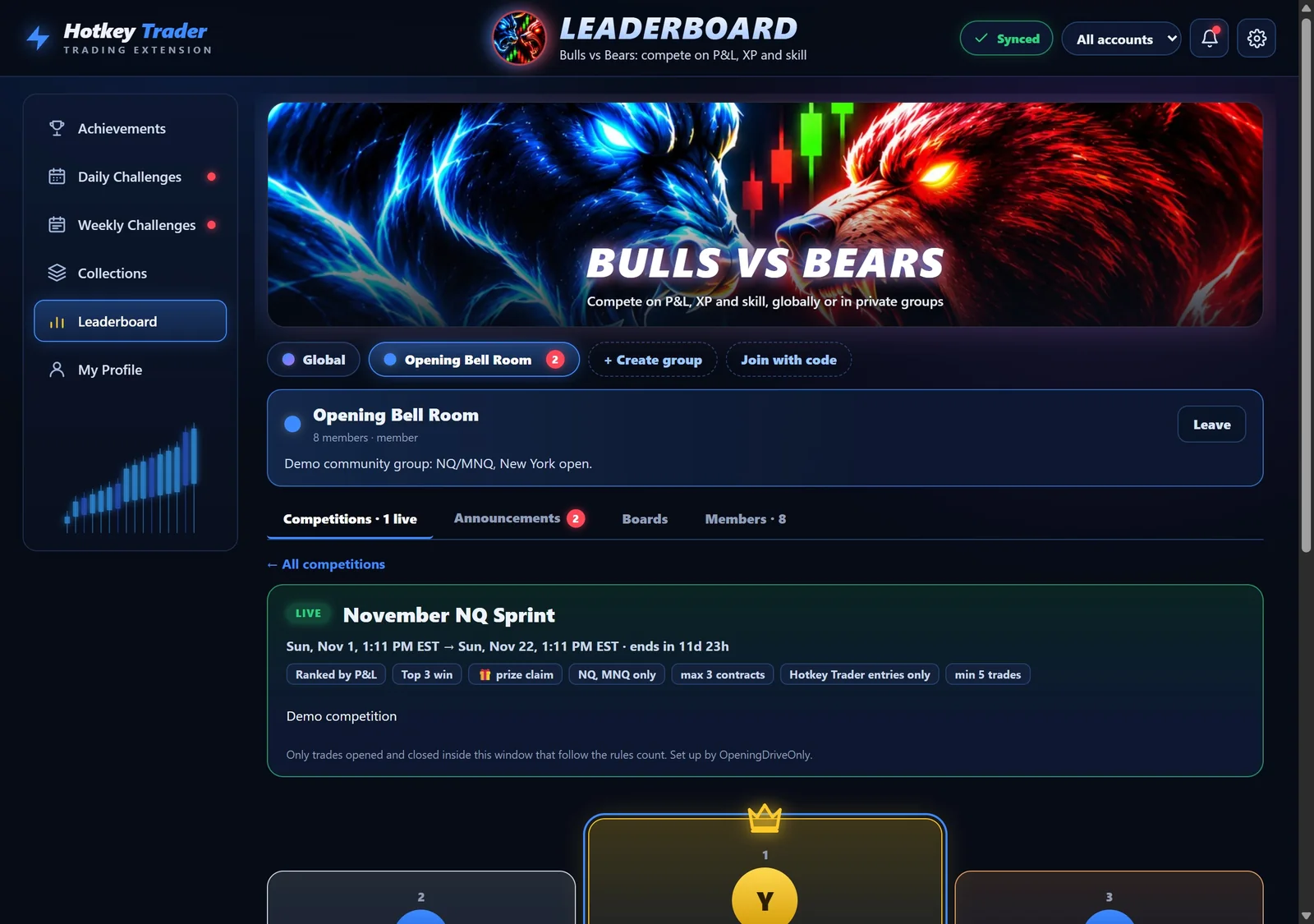
Start a private group, share the invite code, and run competitions with real rules. Results come from synced journal trades, not screenshots.

A group competition, 'November NQ Sprint', with its rules and the top three traders on a podiumDemo group · demo traders
  • Competitions with exact windowsStart and end date, time and time zone. Only trades opened and closed inside count.
  • Rules that are checkedInstruments, max contracts, Hotkey Trader entries only, minimum trades.
  • Winners and prizesChoose how many places win. Winners get badges and a private thread with the organiser.
  • ModerationOwners promote leaders, remove or ban members. A banned cheater is disqualified and everyone below moves up.
  • Discord P&LMembers can post each closed trade to their own Discord channel, green for wins, red for losses.
Creators & communities

Run a channel, a stream or a Discord? Partners get a recurring commission, their own discount code for their audience, Pro+ free, and branded groups and competitions with their logo and links.

See the partner program
Live-Fit ATMPro+

Stops sized to today's market.

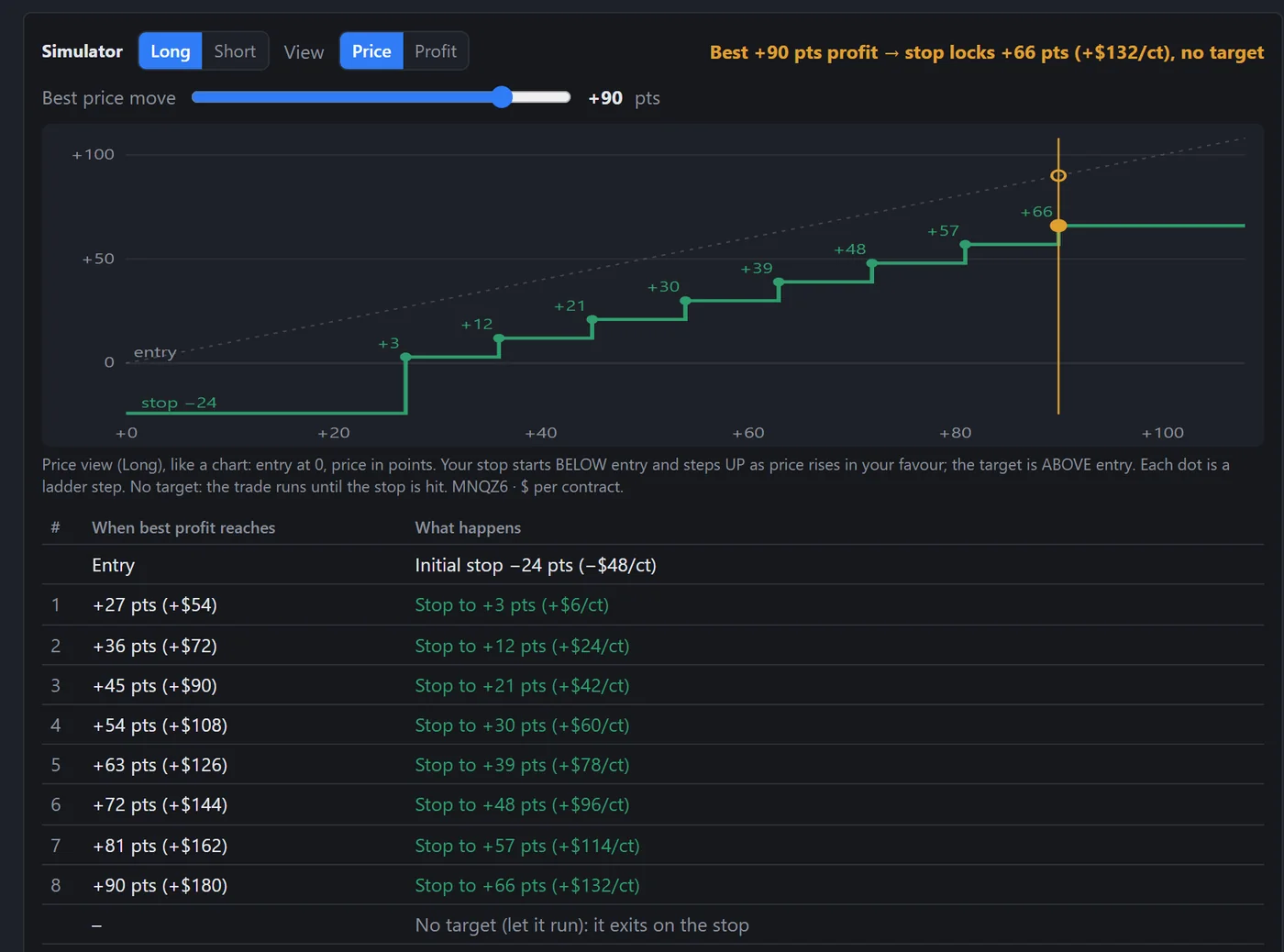
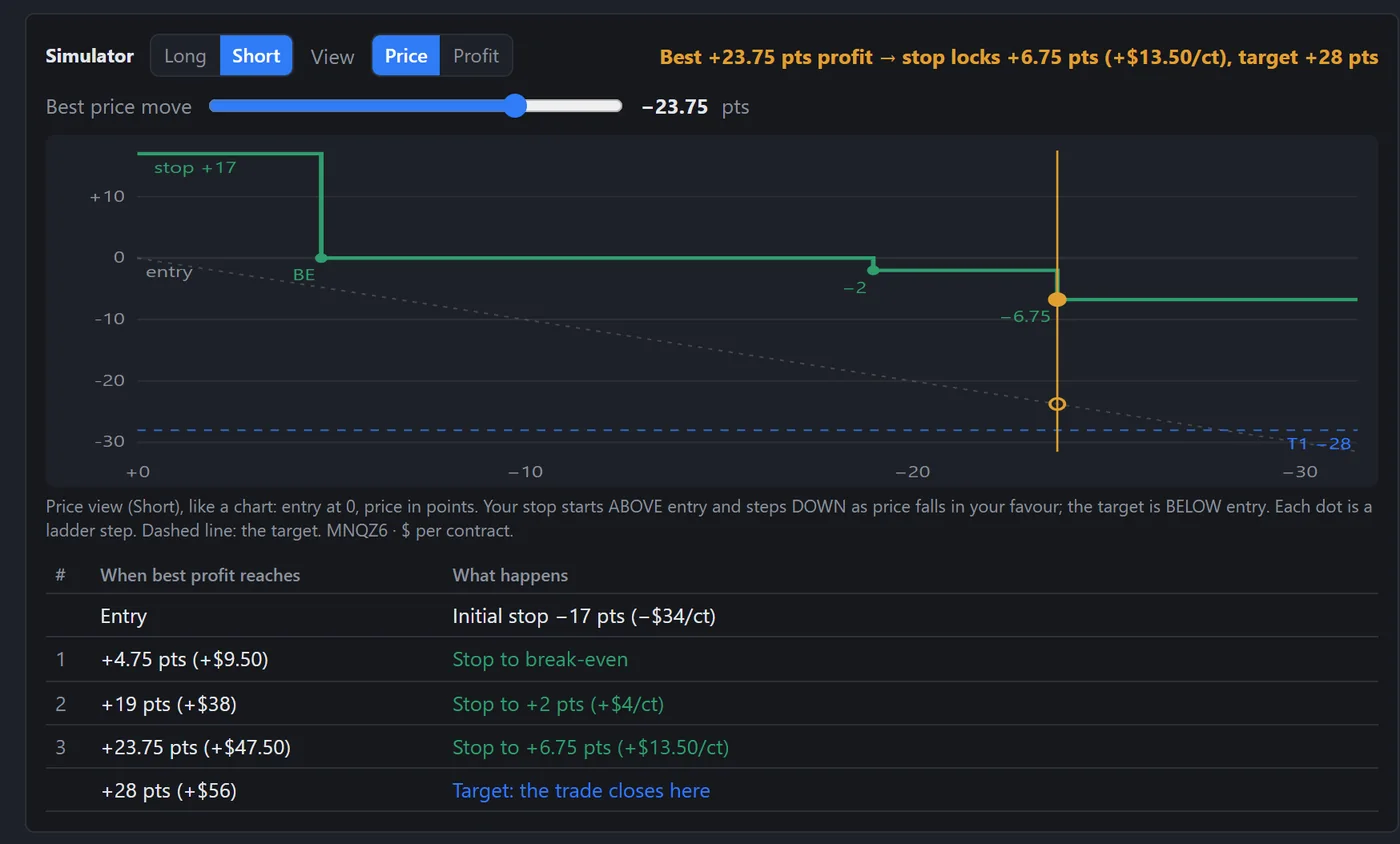
A fixed ATM uses the same distances on a quiet morning and a wild one. Live-Fit doesn't. Press Re-tune and it reads how the market is moving right now, then fits your stop, steps and target to that.

  1. Read the market

    Re-tune reads the last 20 one-minute candles of your chart's instrument and the regime: how much it's moving, and which way.

  2. Fit the plan

    It sizes the stop, the ladder steps (each one a trigger and where the stop moves, break-even first) and a target, or lets it run. Live-Fit Trail fits a trail distance instead. Long and Short each get their own plan.

  3. You pick the entry

    You still trade by hand. Live-Fit shapes the exit; it never enters a trade for you.

In the extension: Settings → ATM Strategies → Live-Fit Ladder or Live-Fit Trail. Included in Pro+ and Founders.

Live-Fit Ladder · Long
MNQ · last 20 × 1m Trending up · volatility expanding Long · with the trend → Room to run
Reading the last 20 one-minute candles…
Illustration with an example market, not real prices. Same market, two sides: the Long trades with the trend and gets room to run; the Short trades against it and gets a tighter stop and a quick target.

Every step, before you trade.

The plan opens in the same step-by-step simulator as your other ATMs, in points and $ per contract. Price view is the default and reads like your chart: a Long's stop climbs, a Short's steps down. Prefer profit? Switch to Profit view.

Why it's different

  • No fixed numbers. Every distance comes from the candles at the moment you Re-tune, not from a preset picked on a different day.
  • Regime-aware. With a strong trend: a looser stop and room to run. Against it, or in chop: a tighter stop, an early break-even and a quick target. Volatility expanding: a wider stop that locks profit sooner.
  • One slot, not 50 ATMs. Each Re-tune refreshes the same Live-Fit slot in place, so your ATM list never fills up with copies.
  • Save the ones you like. "Save as my ATM" keeps a set for good: Long, Short or both.
  • Long and Short, separately. The same market can call for different exits on each side, so each side gets its own plan.
  • Your limits. An optional max stop per contract caps how wide a stop can get. Tuned values stay on the computer that tuned them.
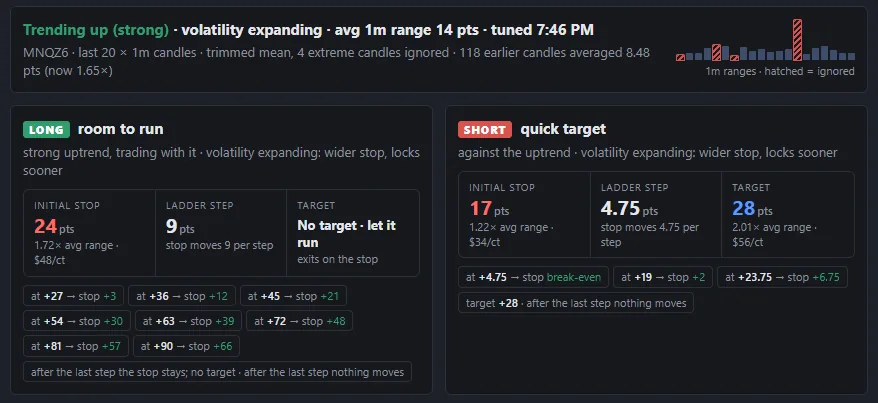
One Re-tune result: the market read as trending up with volatility expanding. The Long plan says room to run with a wider stop and no target; the Short plan says quick target with a tighter stop and an early break-even Example values · demo data
One Re-tune on demo data: the same up-trending market gives the Long room to run and the Short a quick target. Example values, not recommendations.

Live-Fit sizes stops and targets to recent market movement. It doesn't predict price or guarantee results.


Pricing

Try the full pad free for 8 days.

Pro and Pro+ both start with an 8-day free trial. After that it's a paid plan, or the one-time Founders license.

Pro

The full programmed pad, full ATMs and the risk controls.

$19/month

8-day free trial

Coming soon
  • Every smart button: entries with ATMs, partials that trim brackets, Break Even, Reverse, SL/TP nudges
  • Full ATMs: multi-target, break-even, lock, ratcheting trail, ladder
  • Breakout OCO
  • Profit cap and balance stop
  • Trade journal, achievements and leaderboards
  • News countdown and Discord P&L posts
  • Keyboard shortcuts and settings sync
  • Copy trading to 1 follower accountLeader plus one copy, each with its own ATM.
Recommended

Pro+

For traders running several accounts, and for community hosts.

$34/month

8-day free trial

Coming soon
  • Everything in Pro, plus:
  • Copy trading to up to 10 follower accountsEvery follower gets its own order and ATM.
  • Every pad button goes to all your followers at once
  • The balance stop watches each copy account on its own
  • Host private groups and competitions
  • Live-Fit ATMRe-tune reads the current market and sizes your stop, ladder or trail and target for each side.

Founders Lifetime One-time payment · first 50

Pay $149 once and keep Pro+ forever. A paid one-time license, not a subscription and not a trial, limited to the first 50 traders who back Hotkey Trader early.

$149one-time
Coming soon

Prices in US dollars. Release date: coming soon. Want to know the day it opens? Get early access.


FAQ

Straight answers.

Where does it work?

In Google Chrome, on Tradovate's web trader at trader.tradovate.com. It opens as a side panel next to the Tradovate tab. It doesn't work in Tradovate's desktop or mobile apps, TradingView or NinjaTrader.

What's free?

Only the trial. Pro and Pro+ each start with an 8-day free trial. After the trial you need a plan to trade from the pad. Founders Lifetime is a separate $149 one-time payment for Pro+ for life.

If a plan ever ends, Close, Flatten and Cancel keep working, so you're never stuck in a trade.

Demo or live?

Both. Live trading is off by default: orders on a LIVE session are blocked until you turn on "Allow live trading" in Settings. Test your setup on demo first.

Does my Tradovate tab have to stay open?

Yes. The ATM logic runs in your browser, so break-even, lock and trail moves, breakout brackets, the profit cap, the balance stop and copy trading only work while the Tradovate tab is open and your computer is awake and online.

The first stop and targets of an ATM entry go to Tradovate as one bracket order, so they stay on Tradovate's servers even if the browser closes. Only the moves after that stop.

How many accounts can I copy to?

Pro copies to 1 follower account, Pro+ to up to 10. Every button on the pad is copied, each account with its own ATM. Copy trading works between accounts on the same Tradovate login. Fills can differ between accounts, and many prop firms restrict copy trading, so check their rules first.

Do you see my Tradovate password or my data?

No password, ever: orders go from your browser to Tradovate using the session you're already logged into. Hotkeys, ATMs and your journal stay in your browser unless you create an account. If you do, closed trades sync with the account number replaced by a one-way code, and your notes and tags are never uploaded. Details in the Privacy Policy.

Can I refer a friend?

Yes, once plans open. Your account has its own referral link in Settings → Account. When a friend you refer pays for their first month, you earn 1 free month, up to 12 a year. The trial doesn't count; their first paid month does.

Run a channel or a trading community? The partner program is built for you.

Is it affiliated with Tradovate?

No. Hotkey Trader is an independent tool and isn't affiliated with, endorsed by or supported by Tradovate or NinjaTrader.

How do I cancel or change my plan?

Manage subscription and sign in with the email you used at checkout. There you can switch between Pro and Pro+ or monthly and yearly, update your card, see invoices, or cancel. If you cancel, your plan keeps working until the end of the period you've paid for. Your receipt emails also have a link.

When can I get it?

The release date is coming soon. Email us for early access and we'll tell you when it opens.

Does it give trading advice or signals?

No. It's a tool that sends the orders you choose. Presets, journal stats and leaderboards aren't advice, and nothing here promises results.

Trade the plan.
Let the buttons do the work.

Hotkey Trader is in final testing. Send us a one-line email and you'll hear first when it opens.

Release date: coming soon
Get early access